An isometric battlefield is easy to read when you can identify your units, understand the space they occupy, and predict what a command will do. Detailed scenery can support all three. Trouble starts when the scenery makes those answers ambiguous.
We love a tiny, beautifully drawn room. A battered cabinet, a cable crossing the floor, a doorway with a little light above it. Lovely stuff! But once a tactical decision depends on that room, every decorative edge competes with information the player needs.
The useful question is less “does this screenshot look good?” and more “can I confidently choose my next move?” Here is a practical way to think about the difference.
How do I show which tile a unit occupies?
Use a clear floor marker to identify occupied space and a separate cue to identify the unit. A visible head or portrait does not necessarily reveal where the feet belong.
Imagine a hypothetical squad game with a diamond-shaped grid. A soldier stands beside a tall cabinet. Their head appears above the cabinet, but their feet disappear behind it. You can find the character; you cannot confidently identify their tile.
That is an occupancy problem. Enlarging the character portrait would not solve it. A floor marker around the occupied tile might, provided its visible edges remain clear. An outline around the hidden character could help you locate them, while a selected-unit label confirms whose orders you are changing.
Those cues do different jobs. The outline answers “where is the person?” The tile marker answers “which space are they standing on?” Treating them as interchangeable is an easy way to leave half the problem unsolved.
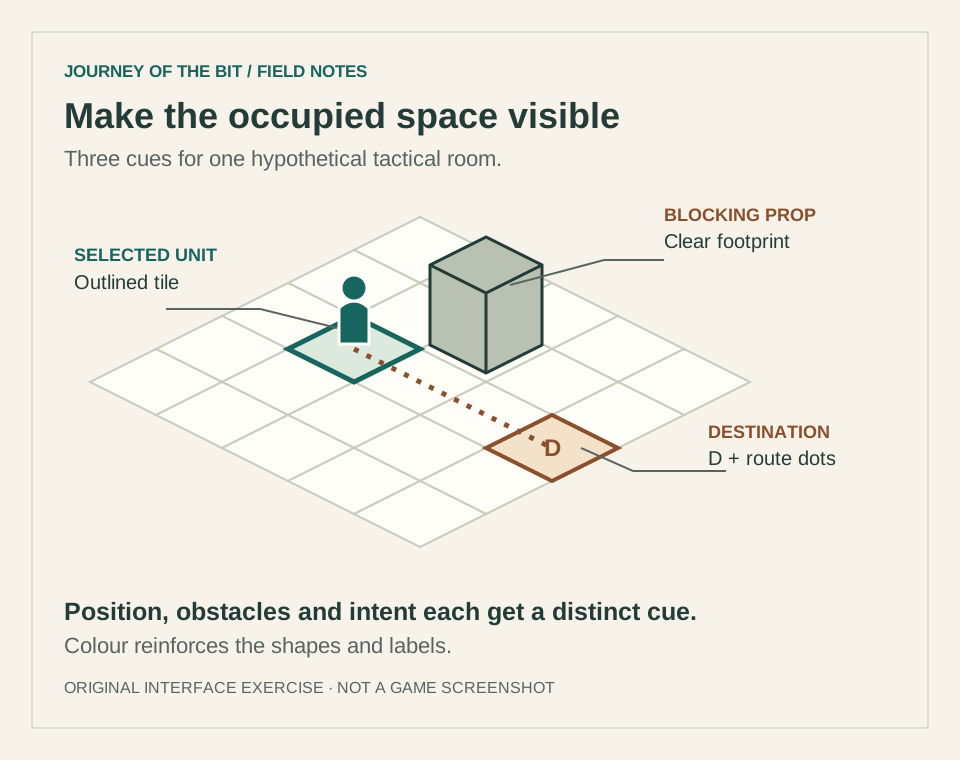
This invented diagram separates three pieces of information: the selected unit's tile, a prop's footprint, and a proposed destination. It illustrates interface ideas, rather than a screenshot or a complete movement system.
How do I make a prop’s footprint readable?
Make the object’s base and relationship to the floor clear at normal playing size. Add surface detail after its occupied space is understandable.
A cabinet can have a clear silhouette and still have an unclear relationship to the floor. Does it fill one tile or two? Can someone stand beside its narrow edge? Is the dark patch underneath a shadow or another obstacle?
For our hypothetical room, start with a simple box whose top and sides are visibly different. Align its base with the occupied tile. Add scratches and handles after the footprint reads at ordinary play size. If those details break the silhouette, simplify them or lower their contrast.
This is where retro art can be wonderfully economical. A few deliberate edges can explain a solid object without much texture. The important bit is consistency: if similar-looking cabinets have different movement rules, the interface needs to explain the difference when it matters.
A beautiful object does not automatically make a good tactical landmark. Its shape has to support the rule the player is trying to infer.
How do I handle visual occlusion without revealing hidden enemies?
Distinguish scenery hiding a known unit from visibility rules withholding information. Fade or outline known objects only in ways that preserve the game’s information rules.
Isometric views put tall things in front of short things. Walls, pillars and neighbouring units can hide the very space you need to inspect.
Possible responses include fading a foreground wall, drawing a selected character's outline, or offering another camera angle. Each has a cost. A faded wall may make the room boundary less obvious. Extra outlines can merge into visual noise. Camera rotation can help inspection while changing the player's sense of direction.
Choose the response around the question that needs answering. If a friendly unit is known to be behind a wall, a selection cue could preserve their position. If an enemy is hidden by the game's visibility rules, drawing their silhouette would reveal information the player should not have.
Rendering occlusion and tactical visibility are separate concepts. Solving the first should not accidentally rewrite the second.
What should an action preview show before commitment?
Show the destination, route and cost as separate pieces of information. The preview should follow the action’s rules and explain any uncertainty.
Now imagine clicking the floor beyond the cabinet. A destination diamond tells you where the order ends. A route preview tells you how the unit expects to get there. A movement-cost label tells you what that journey spends.
Those are three different promises. A route that appears to pass through a solid cabinet is confusing even when the final destination is legal. A destination that quietly snaps to a neighbouring tile can be worse: the player thinks they issued one order and receives another.
In this invented example, the preview would follow the same movement rules as the committed action. If new information could interrupt the route, that uncertainty should be explained rather than disguised as certainty.
Our note on time units and action points explores why the cost of movement matters. Readable space and readable costs belong together.
How do I make tactical cues work without colour alone?
Pair colour with meaningful shapes or text. A destination diamond and a labelled blocked tile remain distinguishable without relying entirely on hue.
A green destination and a red blocked tile may feel obvious to their designer. Colour alone asks every player to perceive and interpret that distinction the same way.
The Game Accessibility Guidelines recommend avoiding essential information conveyed only through fixed colour, alongside readable text and sufficient contrast between interface elements and their backgrounds. The W3C explanation of colour use likewise describes adding information such as shape or text. That second resource concerns web accessibility; applying its principle to this battlefield is our design interpretation, not a claim of game certification.
For the hypothetical interface, a destination might use a diamond and a label, while a blocked tile uses a cross and a short explanation. Colour can reinforce the difference. It should not carry the entire message.
How can I review battlefield readability?
Review the scene at intended playing size with selection and action previews visible. Check occupied space, obstacles, labels and hidden-information rules together.
A screenshot at full resolution is only one view of the problem. Try reviewing the scene at its intended playing size, with a unit selected and an action preview visible.
- Can someone point to the selected unit's occupied tile?
- Can they distinguish walkable floor from a prop's footprint?
- Does the proposed route visibly avoid known obstacles?
- Can they recognise important states without relying only on colour?
- Do labels remain legible against both busy and quiet backgrounds?
- Does hiding foreground scenery preserve the rules about unseen information?
Greyscale can help expose an over-reliance on colour, but it is only a quick diagnostic. Feedback from players with different visual needs is more useful than assuming one filter represents everyone's experience.
A readable battlefield leaves more attention for the decision itself: who moves, who waits, and what risk feels worthwhile. Tiny pixels, fairly big responsibility.
Join us on Discord to share tactical interfaces you love and discuss the decisions behind them.