Tactical icons should communicate their meaning even when the player cannot reliably distinguish their colours. Pair colour with a distinct shape, symbol or readable label, especially when the difference changes an action. Colour can reinforce a message without carrying it alone.
A tiny marker might decide whether you move into danger, select the wrong unit or spend an action you meant to save. That is a lot of responsibility for a slightly different shade of green!
Our isometric readability guide looks at the battlefield as a whole. This note concentrates on a smaller problem: designing a consistent set of markers whose meanings survive changes in colour and context.
What goes wrong when colour is the only difference?
Identically shaped icons can become ambiguous when their colours are difficult to tell apart. A player may recognise that a marker exists without knowing which instruction it represents.
Imagine an invented tactical interface with three circular destination markers. Green means a legal destination, amber means a legal destination with a known hazard, and red means movement is blocked. Each circle has the same size and outline. Without the colour distinction, the interface offers three versions of the same symbol for three different decisions.
The Game Accessibility Guidelines recommend that essential information should not depend on a fixed colour alone. The W3C explanation of colour use describes adding information such as shape or text for web content. Applying that principle to these hypothetical battlefield markers is our design interpretation, not a claim that an icon set has been formally assessed.
The problem is about access to meaning. Making the circles brighter might help them stand out against the floor while still leaving their different meanings unclear.
How could the same three states use shapes and labels?
Give each important state a recognisable symbol and a short explanation that agrees with the rule. Keep the wording and shape consistent wherever that state appears.
For our invented interface, a diamond with an “M” could mean “Move”. A triangle with an exclamation mark could mean “Move: hazard”. A square with a cross could mean “Blocked”. Colour could still distinguish the states, but the outline, inner symbol and label would offer additional clues.
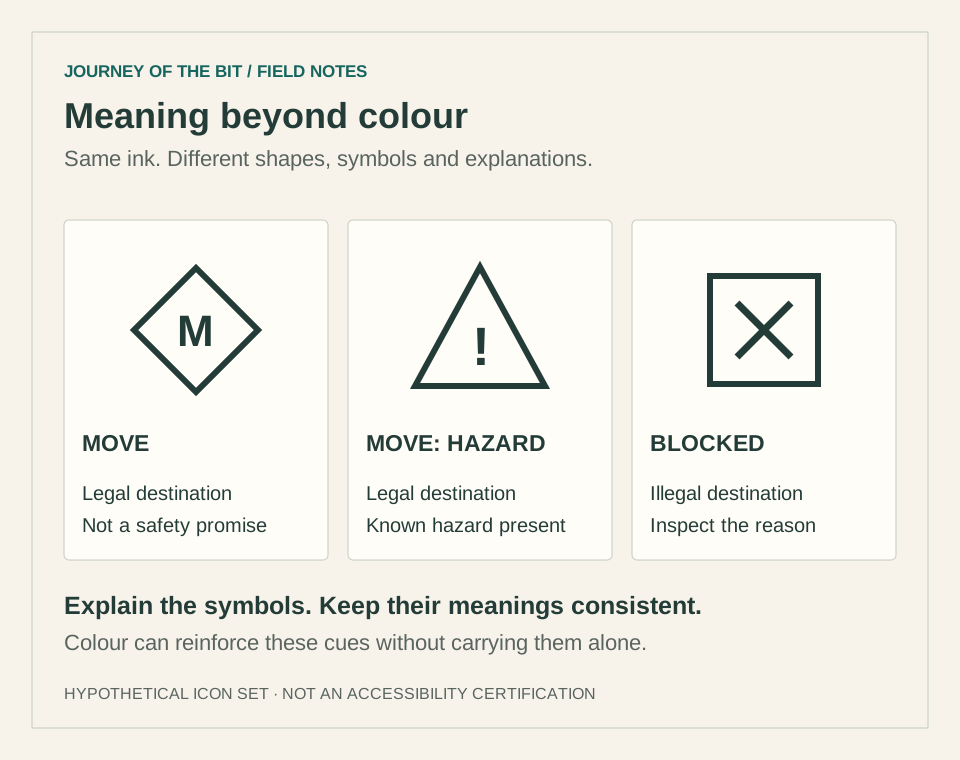
These proposed symbols illustrate redundant cues. They are not a universal icon standard, and a new player would still need an introduction or legend explaining them.
| Intended meaning | Proposed cue | What the explanation should clarify |
|---|---|---|
| Legal destination | Diamond with M; Move label | The move is allowed, not guaranteed safe |
| Legal but hazardous | Triangle with exclamation mark; Move: hazard label | The known hazard and its consequence |
| Illegal destination | Square with cross; Blocked label | Why movement is unavailable |
“Move” must not quietly mean “safe”. A legal tile could be exposed to an opponent even when no environmental hazard is marked. The labels need to explain the actual promise the interface makes.
What happens when a tile has more than one state?
Decide how overlapping states are presented before adding more icons. Selection, movement eligibility and danger answer different questions, so one marker should not accidentally erase another.
Suppose a unit occupies a hazardous tile and the player selects it. Replacing the hazard symbol with a selection circle could hide a consequence the player still needs to understand. In this hypothetical design, selection might instead use a border around the unit while the hazard badge remains beside the tile.
That is only one possible arrangement. The important review is to combine states deliberately: selected and hazardous, reachable and occupied, blocked and under the cursor. Check what remains visible and which explanation appears when the player inspects the position.
Our note on visible targets that cannot be attacked makes a related distinction. Showing that something exists does not establish that an action is allowed. An icon should help keep those questions separate.
How can an icon set stay clear without filling the map with symbols?
Prioritise information that changes the current decision and reveal additional detail through an accessible inspection method. Reuse a small, consistent vocabulary instead of inventing a new mark for every combination.
A movement preview might show the destination state immediately, then provide a short reason when that destination receives focus. A blocked tile could explain “occupied” or “insufficient movement” without requiring a permanent unique symbol for each cause.
Do not make essential explanations available only through mouse hover. A game supporting keyboard, controller or touch needs a way to inspect the same information with those inputs. A persistent details panel, selectable legend or focus-triggered description could serve that purpose, depending on the interface.
We would also examine decoration around the markers. A beautifully textured floor can swallow the edge of a small symbol. Shape differences are less useful if the player cannot find the shape in the first place.
How should tactical icons be checked at normal playing size?
Review the complete interface at the size and viewing conditions players will use. Inspect recognition, readability and interaction together rather than judging enlarged icons on an empty artboard.
Start with a monochrome view to ask whether meaning relies entirely on hue. Then restore colour and place the symbols over busy terrain, selection effects and unit sprites. Check whether the inner mark survives at the smallest supported interface size and whether the label can be read without covering the destination.
Monochrome and colour-vision simulations are diagnostic tools, not substitutes for feedback from players with different visual needs. They cannot represent every combination of vision, display, viewing distance and input method. Nor does passing a shape-recognition exercise establish that the whole interface is accessible.
For useful feedback, ask someone to explain what action they expect from each marker. “That one looks different” is less informative than “I can move there, but the triangle warns me about a hazard.” Our feedback guide offers a way to record expectations and observations without assuming a particular fix.
What is a practical checklist for tactical icon design?
Check whether the player can identify the state, understand its consequence and inspect the reason. Preserve that meaning across colour choices, overlapping states and supported inputs.
- Can the important icons be distinguished without naming their colours?
- Does the same shape keep the same meaning across screens?
- Is a legal action clearly different from a safe outcome?
- Can selection coexist with warnings without hiding them?
- Are explanations available through every supported input method?
- Do symbols and labels remain legible at ordinary playing size?
Retro presentation can be compact and expressive. A few deliberate shapes can do a surprising amount of work when the rules behind them are clear.
Join the studio conversation on Discord to discuss the interface details that make tactical games easier to understand.