A gameplay screenshot can show how a combat scene presents units, terrain and information at one moment. It can suggest questions about movement, targeting and readability, but it cannot demonstrate the full rules or how a turn feels to play. Separate what is visible from what you are inferring, then choose the next piece of evidence that would settle the question.
That is not a reason to ignore screenshots. A good still can reveal details that rush past in a trailer. The trick is to use it as evidence of a particular view, rather than treating every familiar icon as a promise about the whole game.
How do you know what kind of image you are looking at?
Check the image's source, caption and context before interpreting its interface. Gameplay captures, concept illustrations and promotional artwork answer different questions.
Valve's Steamworks guidance on store screenshots asks developers to show gameplay rather than concept art or pre-rendered cinematic stills. It also notes that showing the in-game interface can help players understand how they will interact. That is guidance for Steam store assets, not proof that any image encountered elsewhere represents ordinary play.
Look for a build or version label, and distinguish the publisher's media from a player's modified game. A crop shared without its caption may have lost important context. An old image can still be useful for discussing visual design, but it may not describe the interface you would encounter today.
Our illustration below is deliberately labelled as an invented mock-up. It is a reading exercise, not a screenshot of a real game or evidence of a feature in development.
What can you confidently record from a single frame?
Record visible objects, labels and relationships without assigning rules that the image does not explain. Keep observations specific enough that another reader could point to the same evidence.
Imagine a frame containing a character marked A, a crate, a dotted line ending at a diamond marked D, and an unlabelled “65%” panel beside another character. You can say that the line and number are displayed. Calling the line a confirmed legal movement route or the number a hit chance requires more context.
Even a plausible interpretation needs limits. If a tooltip explicitly says “hit chance: 65%”, it establishes what the interface displays for that selection. It does not reveal the calculation, explain whether the value changes after movement, or establish the probabilities for other weapons.
The same restraint applies to a shield icon. Its presence is visible. Whether it means cover, armour, a defensive ability or a temporary effect is a question for the legend, tooltip or manual. Recognising the shape from another game is a useful hypothesis, not confirmation.
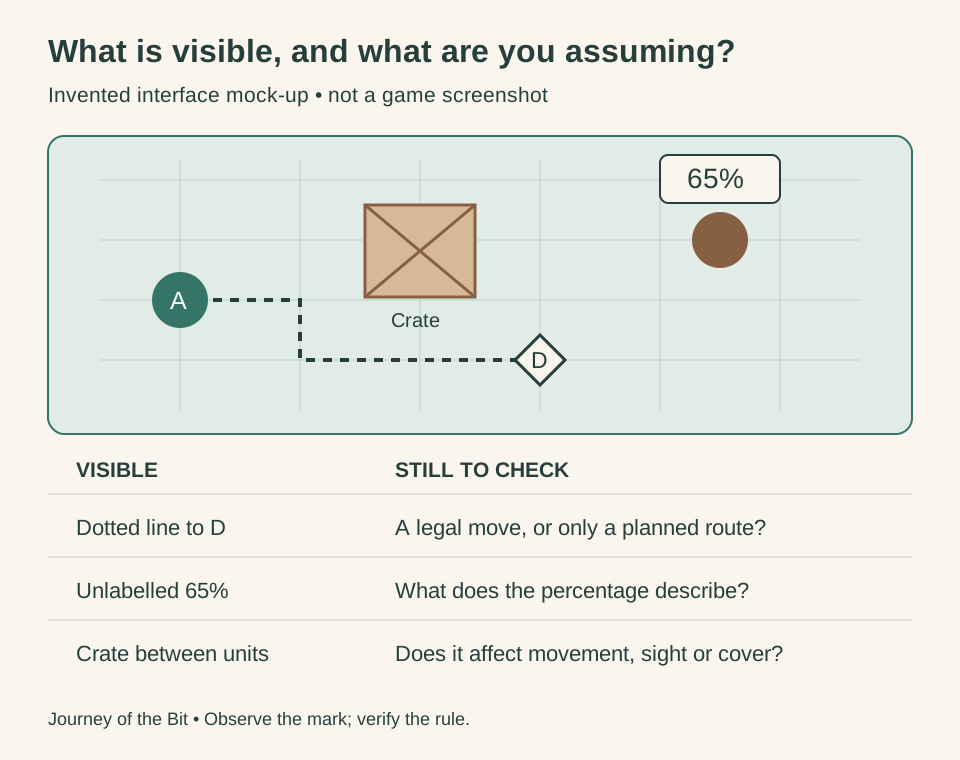
Original mock-up, not a game screenshot. The labels below the frame distinguish visible marks from the rules a reader might assume they represent.
What does the invented frame leave unanswered?
It leaves the meaning of the preview, the cost of the action and the result of commitment unresolved. Those gaps determine what evidence to seek next.
Start with the dotted line. Perhaps it is a movement preview that costs one action. Perhaps it is a planned route that the unit cannot complete this turn. The picture alone cannot choose between those interpretations. A tooltip explaining the cost would answer one part; a short sequence showing the command and its result would answer another.
Now consider the crate. It sits between the two characters in the drawing. That does not establish whether it blocks movement, interrupts sight, reduces incoming damage or merely decorates the scene. A visible cover indicator would strengthen one interpretation, but its meaning would still need to be understood.
Finally, two visible characters do not establish squad size. Other units may be outside the frame or absent from this encounter. A single selection panel cannot establish the entire roster either. The sensible observation is “two characters are visible here”, leaving the broader question open.
For the related rules distinction, our guide to seeing a target without being able to shoot it explains why visible geometry is only part of targeting.
Can a screenshot establish whether an interface is readable?
It can reveal a readability concern in that image, but it cannot settle usability across devices, settings and changing scenes. Consider the size at which the image is being displayed.
Tiny text in a compressed store thumbnail might become clear in the original capture. Conversely, text that looks comfortable on a large monitor may be hard to read on a smaller display. Check the original image before blaming the game, then look for information about interface scaling and text settings.
The Game Accessibility Guidelines on readable font size emphasise different viewing conditions and recommend allowing a choice of text size. Applying that guidance here means treating a screenshot as a prompt to investigate settings, not proof that they exist or that the game will suit everyone's needs.
Our battlefield-readability article addresses how designers can clarify occupied tiles and action previews. Here, the question is narrower: what can this particular image substantiate?
Which follow-up evidence should you seek first?
Choose evidence that answers your most important unresolved question. More screenshots are useful only if they reveal something the first one could not.
- For an unfamiliar icon or number, find its tooltip, legend or documented explanation.
- For movement cost and action order, watch an uninterrupted command and the remaining options afterwards.
- For reaction timing or animation pace, use footage rather than a still.
- For interface scaling, check documented settings or a suitable demo on your intended display.
- For what persists after combat, inspect the transition out of the mission.
A simple note can keep the process honest: “I can see a route line. I think it previews movement. I still need to check its cost.” That is more useful than confidently importing the rules of a favourite game.
Once those details are clearer, our broader tactical-game comparison guide helps connect them to the experience you want. What is a combat feature you once misread from a screenshot? Join the studio conversation on Discord to discuss games and the way their interfaces communicate.